顯示具有 apache 標籤的文章。 顯示所有文章

2023年9月20日 星期三

Zabbix monitor Apache Service

Zabbix monitor Apache Service

如果使用Apache建置網站,想要了解Apache Service運作狀態,可以使用Zabbix Server進行服務監控。

設備環境

以Zabbix Server 為示範,OS為Ubuntu Linux LTS 22.04,Apache為2.4.52

Apache設定

要對Apache Service進行監控,要先啟動status_module模組。
先確認是否有安裝status_module模組。
#apache2ctl -M 2>/dev/null | grep status_module
設定status.conf,開啟/server-status頁面。
#sudo nano /etc/apache2/mods-enabled/status.conf
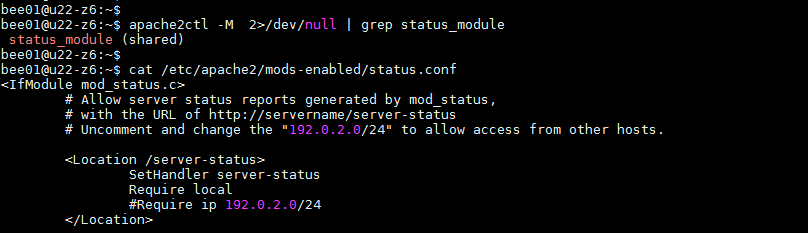
01-check apache module

預設網頁為/server-status,如果需要可以自行修改,更改後Zabbix設定也要更改。
預設只開啟local連線,如果要開啟其它主機連線,可以修改Require ip 指定ip。

設定完成後重新載入apache2設定檔,再使用curl進行測試。
#sudo systemctl reload apache2
#curl http://127.0.0.1/server-status?auto
02-curl check apache status

可以出現Apache Server status資訊,即設定成功。就可以至Zabbix WEB設定。

Zabbix WEB設定

Zabbix Server內建的Templates>Applications 有Apache by HTTP,Apache by Zabbix agent 2種。


Apache by HTTP

官方連結說明翻譯:
此範本專為 Zabbix 透過 HTTP 輕鬆部署 Apache 監控而設計,不需要任何外部腳本。
此範本Apache by HTTP- 透過使用 HTTP 代理遠端輪詢mod_status來收集指標。

新增頁面設定如下:
07-templates apache by http


在Maros頁面新增4組參數,並填入對應的值。
{$APACHE.STATUS.PORT} 
80
{$APACHE.STATUS.PATH} 
server-status?auto
{$APACHE.STATUS.SCHEME} 
http
{$APACHE.RESPONSE_TIME.MAX.WARN} 
10
07-templates apache by http add Maros


Apache by Zabbix agent

官方連結說明翻譯:
此範本專為 Zabbix 透過 Zabbix 代理程式輕鬆部署 Apache 監控而設計,不需要任何外部腳本。
此範本Apache by Zabbix agent- 透過使用 Zabbix 代理在本地輪詢mod_status來收集指標。

新增頁面設定如下:
05-templates apache by zabbix agent

在Maros頁面新增6組參數,並填入對應的值。
{$APACHE.STATUS.HOST} 
127.0.0.1
{$APACHE.STATUS.PORT} 
80
{$APACHE.STATUS.PATH} 
server-status?auto
{$APACHE.STATUS.SCHEME} 
http
{$APACHE.RESPONSE_TIME.MAX.WARN} 
10
{$APACHE.PROCESS_NAME} 
apache2
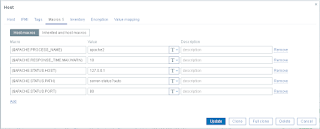
06-templates apache by zabbix agent add marcos


在Configuration > Host中新增2個Templates。
add two templates


在Monitoring > Hosts中2個Templates都有蒐集到資料。也可以發現使用Apache by Zabbix agent比Apache by HTTP多了4種資料。
check templates status


Apache by Zabbix agent多蒐集Apache CPU utiliztion,Apache Memory usage(rss),Apache Memory usage(vsize),Apache Number of running processes 等資訊。
different data

Zabbix使用Zabbix agent2監控Apache Service,是由Zabbix Server透過監控主機的Zabbix agent2捉取資料,屬於被動模式。

2023年9月5日 星期二

Ubuntu Linux Install Apache2+PHP+PHP-FPM

Ubuntu Linux Install Apache2+PHP+PHP-FPM

Ubuntu Linux 22.04 LTS 安裝Apach2+PHP8.1+PHP8.1-FPM

1.安裝完成Apache2

2.安裝 PHP 8.1

3.設置 Apache2 使用 PHP

安裝Apache2 的 PHP module
# sudo apt install libapache2-mod-php

測試Apache2設定檔
# sudo apachectl configtest
# sudo systemctl reload apache2

# 建立測試頁面info.php
# sudo vim /var/www/html/info.php
---
<?php phpinfo(); ?>
---

# 使用瀏覽器連結測試頁面info.php
http://xxx.xxx.xxx.xxx/info.php

4.安裝PHP-FPM8.1

FPM(FastCGI 進程管理器)是 PHP FastCGI 的主要實現,可以有效控制內存和進程,讓服務可以容納更多連線數達到更好的效能。

# sudo apt install php81-fpm

php81 fpm


設定 Virtualhost 支援使用 PHP-FPM.

# sudo vim /etc/apache2/sites-available/000-default.conf

---

 </VirtualHost>

   ## add php8.1-fpm.sock

    <FilesMatch \.php$>

        SetHandler "proxy:unix:/var/run/php/php8.1-fpm.sock|fcgi://localhost/"

    </FilesMatch>

</VirtualHost>

---

啟動proxy_fcgi setenvif模組

# sudo a2enmod proxy_fcgi setenvif

#  systemctl restart apache2

啟動php8.1-fpm設定檔

# sudo a2enconf php8.1-fpm

# sudo apachectl configtest

# sudo systemctl restart php8.1-fpm apache2

# sudo systemctl status php8.1-fpm apache


# 使用瀏覽器連結測試頁面info.php,檢查PHP-FPM是否生效
http://xxx.xxx.xxx.xxx/info.php


2023年9月4日 星期一

Ubuntu Linux Install Apache2

Ubuntu Linux Install Apache2

Ubuntu Linux Server安裝Apache建置Web Server 使用

安裝 Apache2

# sudo apt install apache2
# apache2 -v
# systemctl status apache2


安裝完成後,服務會自動啟動

Apache2基本設定

1.修改安全性設定
# sudo vim /etc/apache2/conf-enabled/security.conf
---
ServerTokens Prod
ServerSignature Off
---

2.將Apache2預設編碼更變為UTF-8
# sudo vim /etc/apache2/conf-available/charset.conf
---
AddDefaultCharset UTF-8
---


3.修改網站可以連結的檔案(index.html,index.htm,index.php)
# sudo vim /etc/apache2/mods-enabled/dir.conf
---
DirectoryIndex index.html index.htm index.php
---

4.增加網站名稱,避免啟動告警訊息
# sudo vim /etc/apache2/apache2.conf
---
ServerName www.beeb.net
---

5.設定管理者email
# sudo  vim /etc/apache2/sites-enabled/000-default.conf
---
ServerAdmin bee01@beeb.net
---

測試Apache2設定檔,沒有錯誤會出現OK
# sudo apachectl configtest

重啟Apache2,重啟Apache2
# sudo  systemctl restart apache2

# 使用瀏覽器連結測試頁面
http://xxx.xxx.xxx.xxx(主機IP)

Apache2配置設定檔及模組檔

Ubuntu Linux將Apache2的設定檔及模組檔都分別為不同檔案,存放於mmods-available目錄。
啟動時Apache2服務,是依據apache2.conf 設定檔並載入mods-enabled目錄的*.load及*.conf檔案 

如果要啟用設定檔及模組檔分別使用 a2encon及a2enmod 進行啟用。
啟動設定檔
# sduo a2enconf security charset
停用設定檔
# sudo a2disconf security charset
啟動模組檔
# sudo a2enmod proxy_fcgi setenvif
停用模組檔
# sudo a2dismod proxy_fcgi setenvif

當啟動/etc/apache2/conf-available目錄存放的設定檔,系統會自動在/etc/apache2/conf-enabled目錄建立對應設定檔的Symbol Link。

當啟動/etc/apache2/mods-available目錄存放的模組檔,系統會自動在/etc/apache2/mods-enabled 目錄建立對應模組檔的Symbol Link

如果停用設定檔及模組檔可以使用a2disconf及a2dismod 停用,
系統會自動刪除conf-enabled 及 mods-enabled 中停用的設定檔及模組 Symbol Link

啟動或刪除設定檔及模組檔後,可以執行apachectl configtest測試是否設定正確,依系統要求重新reload或restart Apache2。

# sudo apachectl configtest
# sudo systemctl reload apache2
# sudo systemctl restart apache2